
LIFT COMMUNICATION · DUTY CENTRE
4G wireless
non-video console
Receive lift-side calls at the duty centre. The console uses 4G IoT wireless transmission, supports hands-free calls and a secondary duty centre, and identifies calls by lift name.
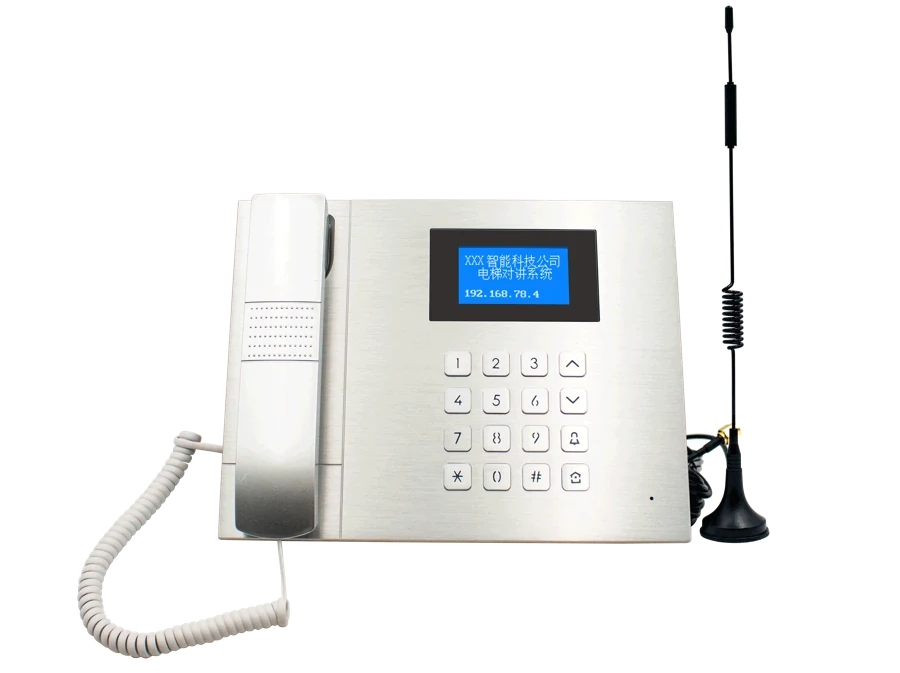
The receiving end sits in the duty centre
Define where staff receive calls, then match the lift-side extension and calling arrangement.
Duty centre
The console receives and places calls. Incoming lift names can be displayed in Chinese or English.
Lift-side extension
The extension connects field intercoms to the console. Check its model, intercom wiring system and power separately.
DUTY CENTRE · RECEIVING
A clear receiving point
at the duty centre.
Lift-side intercoms and extensions reach the duty side over 4G IoT communication. Define staff and receiving points, then check site coverage and accounts.

- ALift site
- BDuty receiving point
- 01
Lift side
Intercoms and matching extension
- 02
4G IoT communication
Coverage, operator and account
- 03
Duty console
Non-video · identify and receive calls
Illustrates system roles. Use the product photos and original references on this page for equipment appearance, interfaces and configuration.
Match calling to the duty arrangement
Define main and secondary duty points and receiving staff. Match lift names, field intercoms and extension models to this console.
Original supporting references
Chinese-language originals. Open when needed.
Lift-side equipment and intercoms appear on the left; the duty room is on the right. Match actual console, extension and intercom wiring systems.
This image describes an extension, including 1–4 configuration labels. It does not show the console panel or define this console’s capacity.
CONFIGURATION & PARAMETERS
Console specifications and configuration
These parameters come from the console entry. Supporting extension interfaces and wiring are shown separately below.
- Communication
- 4G IoT wireless transmission
- Protocol
- SIP
- Voice coding
- G.711/722
- Power
- DC 12V, 2A
- Calling and identification
- Hands-free calls; incoming lift names in Chinese or English
- Configuration
- Mobile mini-program pairing; lift call signs and names
Define the duty-centre calling arrangement
Staff and locations
Provide main and secondary duty-centre locations, receiving staff and the lift-name list.
Field connections
Bring photos of intercoms, extensions, controller cabinets and wiring. Check the intercom system and power.
Communication conditions
Check operator coverage, network availability and account arrangements at the installation location.
MODEL & SITE FIT
Match the console to your duty centre and site
Bring the lift count, duty-centre locations, existing intercom and extension photos, and site coverage information.