
LIFT COMMUNICATION · DUTY CENTRE
IP non-video
console
Receive lift calls through the IP network at the duty centre. Hands-free calling and a secondary duty centre support the site’s calling arrangement, subject to console, extension and network configuration.
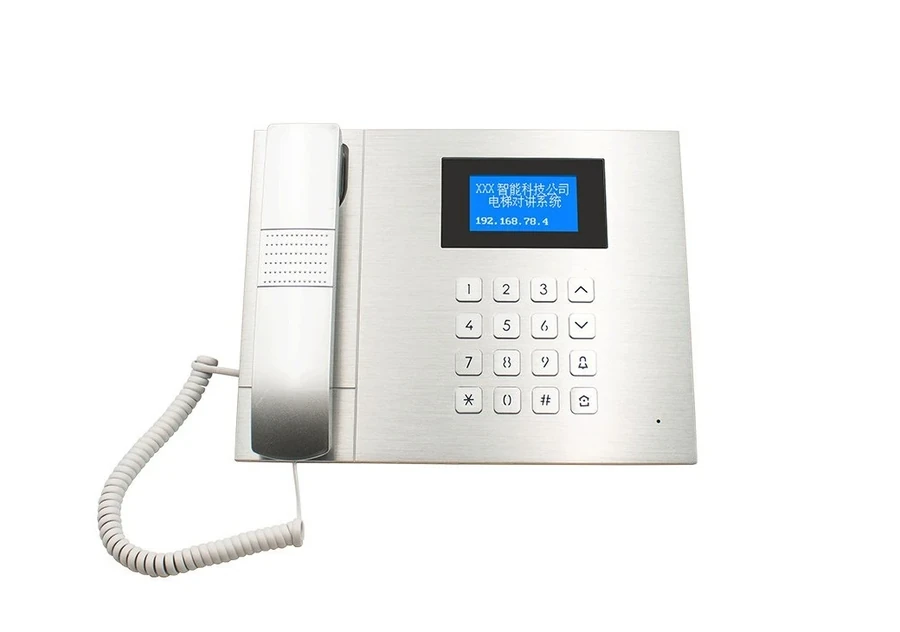
Receive lift calls at the duty centre
Voice communication is the role of this non-video console. Match duty points and lift-side extensions to the project network.
Receiving point
Define main and secondary duty locations, receiving staff and the lift-name list.
Network connection
Check network paths and addressing between console and extensions. The source’s use of “wireless” does not establish an integrated 4G configuration.
DUTY CENTRE · RECEIVING
A clear receiving point
at the duty centre.
Lift-side intercoms and extensions reach the duty side over the project IP network. Define staff and receiving points, then check access paths and addressing.

- ALift site
- BDuty receiving point
- 01
Lift side
Intercoms and matching extension
- 02
Project IP network
Access paths and addressing
- 03
Duty console
Non-video · identify and receive calls
Illustrates system roles. Use the product photos and original references on this page for equipment appearance, interfaces and configuration.
Match calling to the duty arrangement
Define main and secondary duty points and receiving staff. Match lift names, field intercoms and extension models to this console.
Original supporting references
Chinese-language originals. Open when needed.
Non-video consoles appear at the upper right and video models below. Their touchscreen and video functions are not assigned to this non-video unit.
The pictured single-port V1.0 extension and wiring variants are lift-side components, not this console’s panel or capacity.
CONFIGURATION & PARAMETERS
Console functions and configuration
This is a non-video console. The source entry also contains video-display and extension material, which is not assigned to this unit. Check networking against its Ethernet/Internet parameters.
- Console type
- IP non-video console
- Networking parameters
- Ethernet/Internet; confirm the project connection
- Protocol and voice
- SIP; G.711/722
- Power
- DC 12V, 2A
- Calling arrangement
- Hands-free calls; secondary duty centre supported
- Visible panel
- Handset, numeric keypad and name display
Match the console to site conditions
Duty arrangements
Provide receiving responsibilities, duty points and lift names.
Network conditions
Provide console/extension access points, addressing plans and the network maintenance contact.
Field intercoms
Bring extension models, intercom wiring details and power photos to check calling compatibility.
MODEL & SITE FIT
Match the console to duty arrangements and networking
Bring duty locations, lift names, extension/intercom photos and project network conditions.