SMART ENERGY

From a change in usage
to a question to verify.

Read metering records alongside equipment operation and activities. Align the area and period, then agree who verifies the issue and how to review it.

BEFORE YOU START

Clarify the conditions.
Bring the material you have.

For campuses and public buildings with metering records that need context for changes in use.

  1. 01Metering scope and units
  2. 02Schedules and activity records
  3. 03Review owners and follow-up periods

01 / FROM OBSERVATION TO ASSESSMENT

Electricity after closing.
Check evidence before causes.

Product demo

Public-service building B

Building B metering records

The area meter still records electricity use after closing.

Metering scope
Building B public-services facility · Area meter
Observation period
Closing to the next opening; record the date and time zone
Unit & source
Confirm kWh against point documentation; retain the metering export source

Out-of-hours consumption merits attention. Continue with equipment and activity information.

Which evidence can you provide?

Switch the information scope to see its explanation, or use arrow keys.

WHAT TO DO AT THIS POINT

Start with consumption trends.

Review area electricity use outside working hours to identify loads for further analysis.

Metering information: area consumption, record periods and trends.

Next: review activities and operating arrangements to understand the context.

  1. 01

    Understand electricity use by area.

    Bring areas, meters and electricity records together, moving from totals to areas and periods.

  2. 02

    Put consumption in its operational context.

    Use activities, plans and equipment information to understand the context of consumption changes.

  3. 03

    Coordinate the team’s response.

    Connect issues, equipment and handling records for collaboration between operations and maintenance.

  4. 04

    Review changes after adjustments.

    Retain subsequent metering and operational records to follow changes in the same areas and periods.

ENERGY REVIEW WORKFLOW

02 / AREA AND PERIOD METERING

What this interface shows.

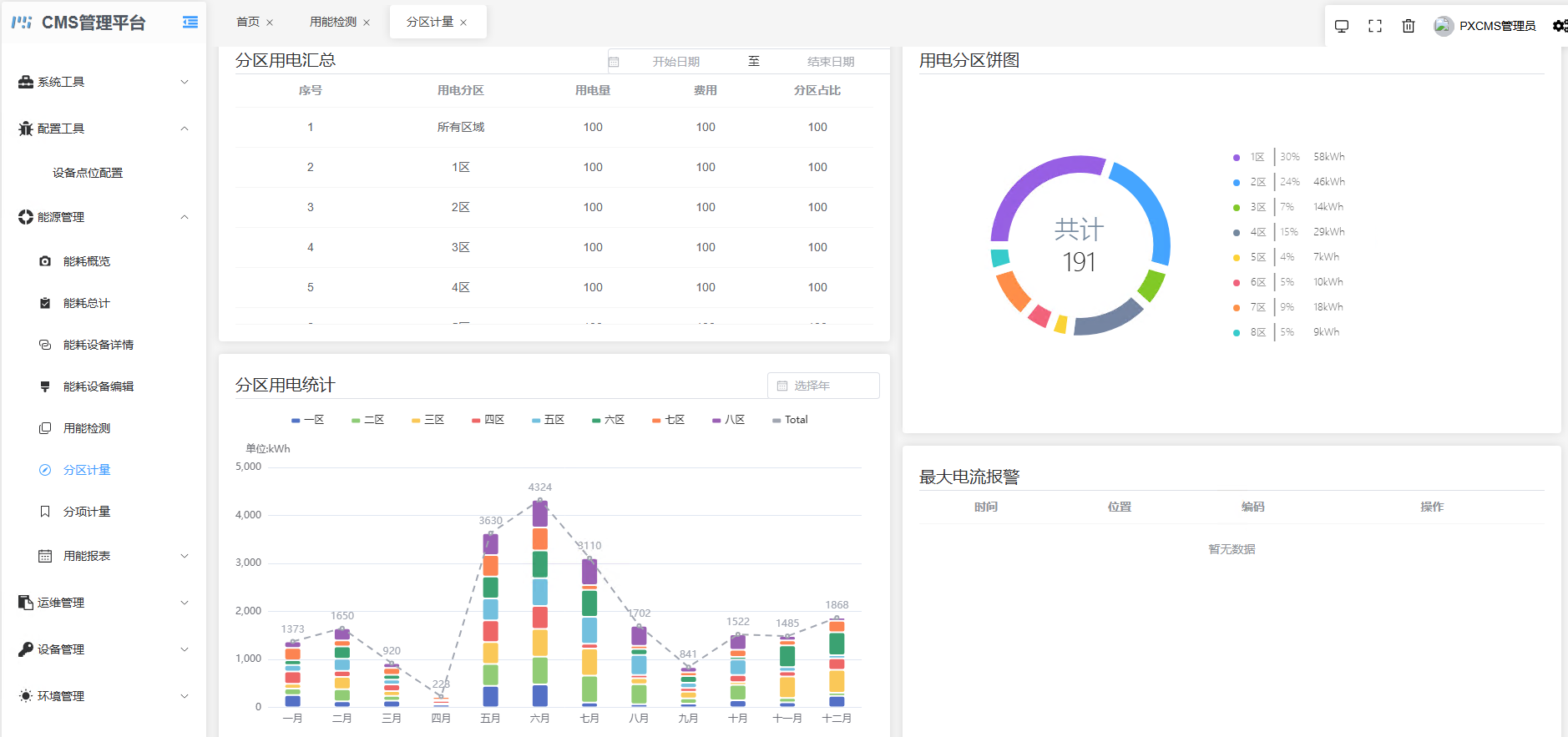
Organize electricity information by area and month, compare distribution and changes over time, then analyze it alongside site operating arrangements.

PsCMS area metering: area summary upper left, shares upper right, monthly statistics lower left and empty maximum-current alarm list lower rightView full interface
PsCMS area metering interfaceReview electricity information by area, month and unit. Original UI in Chinese; the descriptions below explain the same source.

Read details by purpose below. Wide details retain original pixels: swipe within the frame, or focus it and use left/right arrows. The full original is always available.

Identify the areas, then check their definitions.
AREA ELECTRICITY TOTALS
Metering fields and records

Review electricity use, cost and share by area, with start and end dates defining the reporting period.

Area statistics: review consumption in different areas over the selected period.

Areas and months provide different views.
AREA SHARES AND MONTHLY STATISTICS
Metering fields and records

Use area shares to understand consumption distribution and monthly statistics to review changes over time.

Compare consumption distribution and change by area and month.

The empty alarm list only shows no records here.
CURRENT ALARM INFORMATION
Metering fields and records

Review current alarms by time, location and code to find the relevant records.

Alarm records: find related events by time and location.

Return to the metering view

Explore the energy review workflow and area metering interface.

03 / CHOOSE CAPABILITIES BY THE PROBLEM

Start with the role
that addresses the gap.

Select capabilities for integration, information management, interfaces and spatial display. Define interfaces and delivery stages around existing systems.

01

PsIOT

Device connections & data exchange

PsIOT connects equipment and subsystems and organizes data across protocols and properties for business use.

Explore product roles
02

PsCMS

Device management & operational information

PsCMS brings together equipment, energy, processes, maintenance and alarms for shared views and departmental collaboration.

Explore product roles
03

PsCanvas

Compose views when a dedicated interface is needed

PsCanvas organizes area, period and equipment information through canvases, charts and controls, highlighting what different users need.

Explore product roles
04

P.C.I

Add building and device context when location matters

P.C.I uses building space to provide location context, helping users find equipment and business information from an area.

Explore product roles

NEXT STEP

Bring a specific question.
Discuss the delivery scope.

Read metering records alongside equipment operation and activities. Align the area and period, then agree who verifies the issue and how to review it.

Discuss project scope

Product interface

Product interface reference

Switch to actual size and scroll horizontally for details.